Home
» iPhone
»
Siri AI Missing on iPhone in iOS 27? Check Model, Language, Region, and Rollout First
Siri AI Missing on iPhone in iOS 27? Check Model, Language, Region, and Rollout First
If Siri AI is missing on your iPhone after updating to iOS 27, the most important new detail is that the feature is not simply “on for everyone with iOS 27.” Apple’s September 14, 2026 update says Siri AI is rolling out as a beta in English, while French, Japanese, Korean, Portuguese, and Spanish support is planned for the following month. Apple also says access can depend on the iPhone model, language settings, region, and rollout status.
That distinction matters because iOS 27 itself can be installed on more iPhones than can run Apple Intelligence or Siri AI. It also matters because the broader Apple Intelligence language list is longer than the current Siri AI beta language list. Before you reset settings, change accounts, or assume the update failed, work through the four checks below.
Quick diagnosis: why Siri AI may be missing
Check
What Apple currently requires
What a mismatch looks like
iPhone model
An Apple Intelligence-capable iPhone, including iPhone 15 Pro, iPhone 15 Pro Max, and iPhone 16 models or later
iOS 27 installs, but Siri AI does not appear
Language
Siri AI beta is currently rolling out in English
Apple Intelligence works in some areas, but Siri AI beta is unavailable
Region
Availability varies by platform and region; iOS access is initially restricted in the EU, and mainland China Apple Account regions are not currently supported
The device and language look compatible, but the option remains unavailable
Rollout
Eligible users may need to choose “Try Siri AI (Beta)” and wait for access
The option appears, but Siri AI is not ready immediately
1. Check the iPhone model before changing any settings
Start with hardware. Apple says Apple Intelligence in iOS 27 is available on iPhone 15 Pro, iPhone 15 Pro Max, and iPhone 16 models or later. A phone can therefore support iOS 27 without necessarily supporting Siri AI.
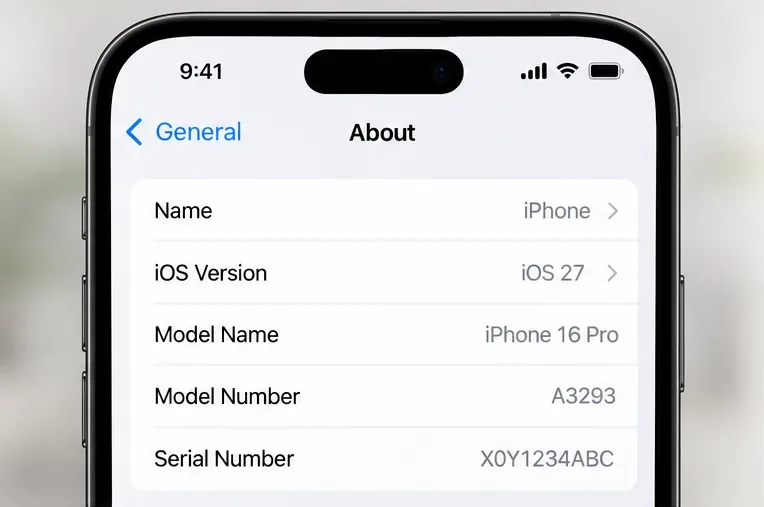
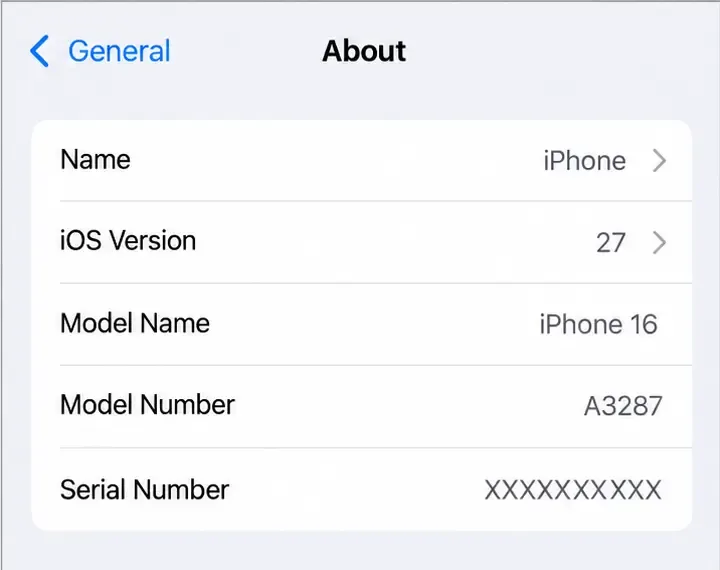
On the iPhone, open Settings, then go to General > About. Check the Model Name and iOS Version. Apple documents this same path for identifying the phone and software version. If your iPhone is outside the Apple Intelligence hardware list, changing Siri language or account region will not add Siri AI.
Check Settings > General > About first. The model and iOS version determine whether it is worth troubleshooting Siri AI settings further.
2. Check both the device language and Siri language
Language is the next common source of confusion. Apple Intelligence in iOS 27 supports a broader set of languages, including English, Chinese, Danish, Dutch, French, German, Italian, Japanese, Korean, Norwegian, Portuguese, Spanish, Swedish, Turkish, and Vietnamese. Siri AI beta, however, is currently rolling out in English first.
That means an iPhone can meet the general Apple Intelligence language requirement and still not have the current Siri AI beta. As of September 28, 2026, Apple says French, Japanese, Korean, Portuguese, and Spanish support for Siri AI is coming next month. Apple has not said that every other Apple Intelligence language will receive Siri AI on that same schedule.
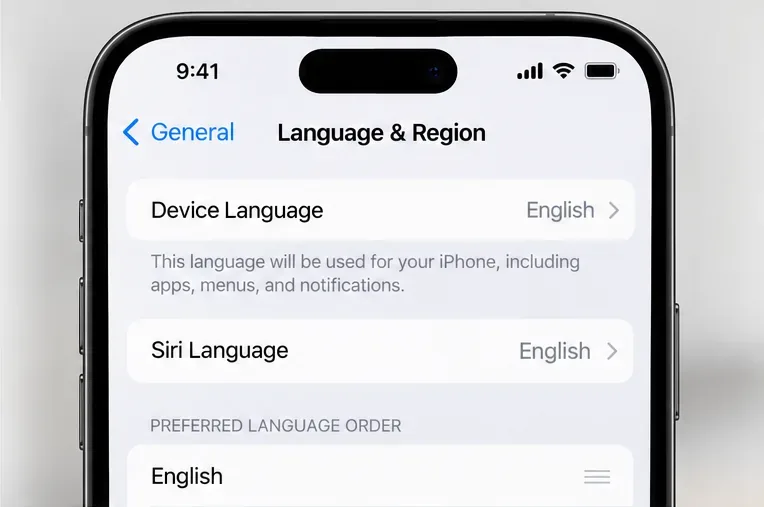
To check the iPhone language, go to Settings > General > Language & Region. To check Siri’s language, go to Settings > Siri > Language. Apple’s Siri AI support page says the device language and Siri language must be set to a supported language.
Device language and Siri language are separate settings. For the current Siri AI beta rollout, English is the key language to verify first.
Do not change your phone’s language just because a social post claims it unlocks Siri AI everywhere. Language is only one eligibility condition. Model, region, and rollout status still apply.
3. Check region restrictions without changing your account casually
Region can mean more than one setting on an iPhone. There is the device region under General > Language & Region, and there is the country or region associated with your Apple Account. For Siri AI, Apple’s support documentation specifically notes regional restrictions tied to platform and Apple Account location.
Apple currently says Siri AI is not available on iOS, iPadOS, or watchOS for European Union residents during the initial rollout. Apple also says Siri AI will not currently work if the Apple Account region is set to mainland China. These are rollout restrictions, not signs that an iPhone is defective.
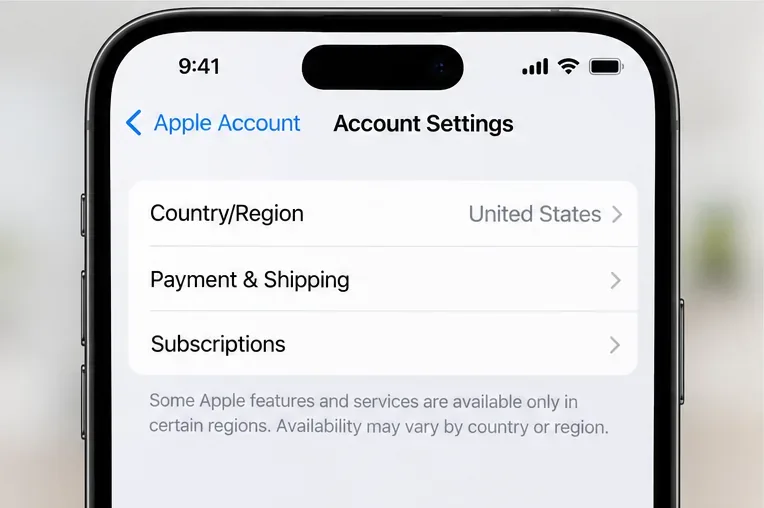
Account region can matter for Siri AI availability. Check it only when region restrictions are relevant; do not switch countries casually as a troubleshooting shortcut.
Changing an Apple Account country or region is a significant account action. Apple warns that you may need to spend remaining account balance, handle subscriptions, wait for pending transactions, and provide a valid payment method for the new country. It is not a sensible first-line fix for a feature that is still region-limited.
4. Check the rollout and waitlist before assuming something is broken
Apple’s current Siri AI setup instructions include a staged-access step. After updating an eligible device, go to Settings > Siri. If Siri is off, turn it on. On supported devices, Apple says you can tap “Try Siri AI (Beta).” The setup flow asks you to choose a voice, complete voice enrollment, and review privacy settings.
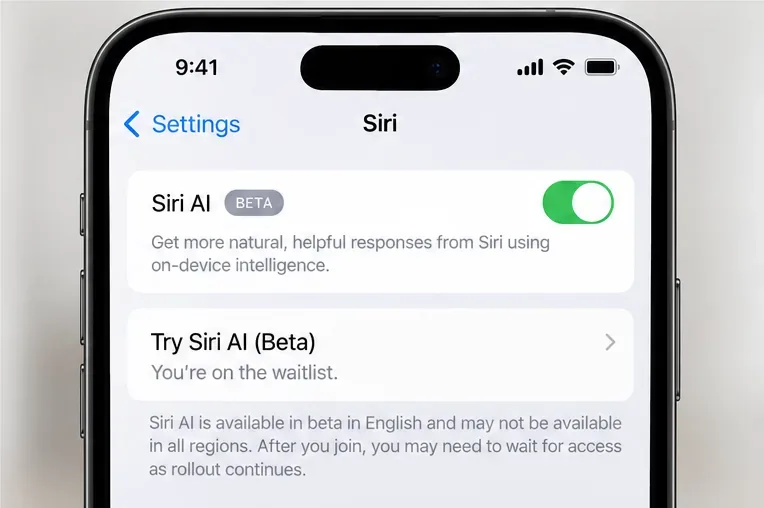
Apple also says this can place you on a waitlist, that wait times can vary, and that Siri AI begins downloading automatically when access is ready. In other words, seeing the option does not guarantee immediate activation.
If “Try Siri AI (Beta)” is present, rollout status may be the remaining factor. Apple says wait times can vary before the feature downloads.
The official setup sequence is in How to get Siri AI. Apple’s September announcement also confirms that the beta rollout began in English: Siri AI is here.
What should you do if the Siri AI option is still missing?
If your model is supported, your iPhone is on iOS 27, your device and Siri language meet the current requirement, and your region is eligible, the next step is to check for a newer iOS 27 update under Settings > General > Software Update. Apple released iOS 27 in mid-September 2026 and may adjust availability through later software or server-side rollout changes.
After that, compare what you see with Apple’s current Siri AI support page rather than relying on screenshots from another country or an earlier beta. The wording and menu placement can change across software versions. Apple also notes that some Siri preferences may appear under “Apple Intelligence & Siri” on some software versions, while iOS 27 documentation commonly shows a dedicated Siri section.
Do not use these as first-line fixes
Do not erase the iPhone just to make the Siri AI menu appear.
Do not change your Apple Account country to a location where you do not actually live simply to chase availability.
Do not assume that enabling another Apple Intelligence feature proves Siri AI should already be active; the language and rollout rules are not identical.
Do not treat a missing Siri AI option as proof of a hardware fault until model, language, region, and rollout have all been checked.
How to know your troubleshooting result is good
A useful troubleshooting result is not necessarily “Siri AI is enabled today.” The goal is to identify which eligibility gate applies to your phone. You should be able to answer four questions with confidence: Is the iPhone model supported? Are the device and Siri languages currently supported for Siri AI? Is the account/platform region eligible? Has Apple opened access for your device, or are you still waiting for the staged rollout?
If one of those answers is “no,” stop there and wait for the relevant hardware upgrade, language expansion, or regional launch. If all four answers are “yes” but the option remains absent after checking for the latest iOS 27 update, use Apple Support rather than repeatedly changing unrelated settings.
Current status as of September 28, 2026
iOS 27 is available, and Siri AI is part of the iOS 27 generation of Apple Intelligence.
Siri AI is currently rolling out in beta in English.
Apple says French, Japanese, Korean, Portuguese, and Spanish support is coming next month.
Siri AI requires an Apple Intelligence-capable iPhone.
Availability still varies by region and platform, with initial iOS restrictions in the EU and current unavailability for mainland China Apple Account regions.
Eligible users may still face a waitlist before Siri AI downloads and becomes available.
Because Siri AI is still in beta and Apple explicitly describes availability as a rollout, these conditions can change. For the most reliable answer on any specific day, check Apple’s own Siri AI requirements page before changing important account settings.